Learning by Building, Part 3: Caltrain Bot, Local LLMs, and Reality
In the previous post, I mainly focused on software and data engineering lessons from working on the Caltrain bot. In this post, I’ll share how I tried to build a small Raspberry Pi–based device for local-only LLM inference, why I failed, and what I did instead.
The post also includes a summary in which I reflect on what else I could do or try, as well as the other interesting possibilities this seemingly small project has opened up.
And don’t forget to try the bot, even if you don’t live in the San Francisco Bay Area!
Raspberry Pi AI HAT+ 2
When Raspberry Pi announced the Raspberry Pi AI HAT+ 2, I was one of the first in line to get one as soon as I could. With 8GB of onboard RAM (complimentary to Raspberry Pi RAM!), 40 TOPS of INT4 inferencing performance, and under 10W of power draw, it sounded like an amazing device for running 1.5B to 3B LLMs.
Pi AI HAT+ 2 is a Hailo-10H accelerator module mounted on a ready-made Raspberry Pi HAT (Hardware Attached on Top). If you can get just the accelerator in an M.2 form factor, there are plenty of HATs available with M.2 sockets. For example, another Raspberry Pi I use for home automation has an M.2 HAT with a 1TB M.2 SSD connected (same as gamers use in PlayStation 5) for file sharing and Docker images.
When I bought the Pi AI HAT+ 2, I didn’t really have a plan for what I was going to do with it. Still, I wanted to experiment with it and get some hands-on experience assembling and using it. After sitting in the box on my desk for a couple of weeks, the idea for the bot and local inference popped into my head.
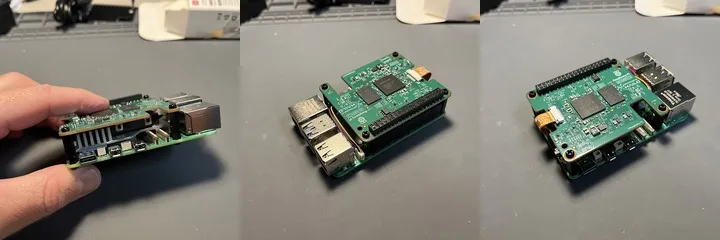 Raspberry Pi 5 with active cooling and Pi AI HAT+ 2 on top
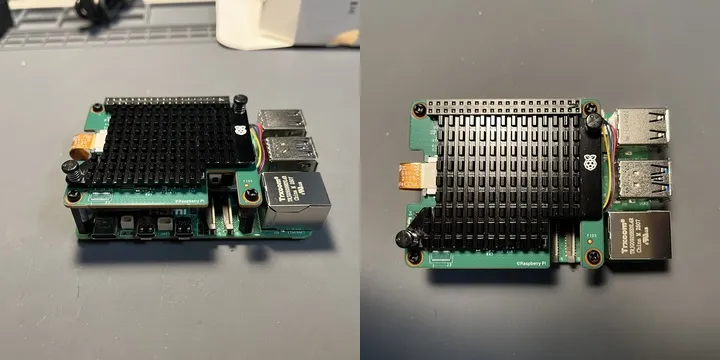 Raspberry Pi 5 with active cooling and Pi AI HAT+ 2 with extra passive cooling
Hailo Documentation
Note: If you’re looking for information, documentation, or a compiler for this accelerator, don’t make the same mistake I did and Google “Pi AI HAT+ 2.” Instead, search for “Hailo-10H”.
Getting started was easy because Raspberry Pi provides straightforward documentation on how to assemble the accelerator and run the so-called “AI software.” Naturally, I was curious about running an LLM. That’s when I became very disappointed by the models I could run.
Hailo asks you to download and install a tool called hailo-ollama. Because the tool includes the word “ollama,” I expected it to be Ollama, which I really like and admire, with some extra tools for Hailo. In reality, though, it’s something very different. To Hailo’s credit, they do mention that users should not think of their binary as the Ollama binary. Still, it was a very frustrating experience.
On top of that, they offer only a limited number of models in their Model Zoo — very limited. For example, even with 8 GB of onboard RAM, the only Whisper model they have in the Zoo is Whisper Small (388 MB), and the only coding model is Qwen2.5-Coder-1.5B-Instruct (1.64 GB). But there’s a catch.
It took me a couple of hours to figure out how to run Whisper Small. Whisper Small requires HailoRT 5.2.0. Although hailo-apps supports both 5.1.1 and 5.2.0 (for Hailo-10H), I had to download the 5.2.0 packages — the PCIe driver .deb, hailort .deb, PyHailoRT .whl, and GenAI Model Zoo — from the Hailo Developer Zone and install them manually, since the Raspberry Pi apt repo serves only 5.1.1.
To make things even more frustrating, the Hailo Developer Zone sits behind a login page. You have to register and sign in to download.
LLM Inference on Hailo-10H
Once I started hailo-ollama:
$ hailo-ollama
I |2026-03-29 20:25:15 1774841115321986|
MyApp:Server running on port 11434
I was really happy that I could run local inference at a decent number of tokens per second:
$ time curl http://ai-berry:11434/api/chat  -H 'Content-Type: application/json' -d '{"model": "qwen2.5-coder:1.5b", "messages": [{"role": "user", "content": "How popular is Raspberry Pi? Answer in one sentence."}]}'
{"model":"qwen2.5-coder:1.5b","created_at":"2026-03-30T03:31:37.097661567Z","message":{"role":"assistant","content":"R"},"done":false}
{"model":"qwen2.5-coder:1.5b","created_at":"2026-03-30T03:31:37.219948798Z","message":{"role":"assistant","content":"aspberry"},"done":false}
{"model":"qwen2.5-coder:1.5b","created_at":"2026-03-30T03:31:37.339826734Z","message":{"role":"assistant","content":" Pi"},"done":false}
{"model":"qwen2.5-coder:1.5b","created_at":"2026-03-30T03:31:37.460778380Z","message":{"role":"assistant","content":" is"},"done":false}
{"model":"qwen2.5-coder:1.5b","created_at":"2026-03-30T03:31:37.581456223Z","message":{"role":"assistant","content":" a"},"done":false}
{"model":"qwen2.5-coder:1.5b","created_at":"2026-03-30T03:31:37.701823577Z","message":{"role":"assistant","content":" popular"},"done":false}
{"model":"qwen2.5-coder:1.5b","created_at":"2026-03-30T03:31:37.822725203Z","message":{"role":"assistant","content":" educational"},"done":false}
{"model":"qwen2.5-coder:1.5b","created_at":"2026-03-30T03:31:37.942850515Z","message":{"role":"assistant","content":" computer"},"done":false}
{"model":"qwen2.5-coder:1.5b","created_at":"2026-03-30T03:31:38.063989554Z","message":{"role":"assistant","content":" platform"},"done":false}
{"model":"qwen2.5-coder:1.5b","created_at":"2026-03-30T03:31:38.183828360Z","message":{"role":"assistant","content":" used"},"done":false}
{"model":"qwen2.5-coder:1.5b","created_at":"2026-03-30T03:31:38.304859248Z","message":{"role":"assistant","content":" for"},"done":false}
{"model":"qwen2.5-coder:1.5b","created_at":"2026-03-30T03:31:38.425307585Z","message":{"role":"assistant","content":" programming"},"done":false}
{"model":"qwen2.5-coder:1.5b","created_at":"2026-03-30T03:31:38.546260750Z","message":{"role":"assistant","content":" and"},"done":false}
{"model":"qwen2.5-coder:1.5b","created_at":"2026-03-30T03:31:38.666923092Z","message":{"role":"assistant","content":" teaching"},"done":false}
{"model":"qwen2.5-coder:1.5b","created_at":"2026-03-30T03:31:38.786800955Z","message":{"role":"assistant","content":"."},"done":false}
{"model":"qwen2.5-coder:1.5b","created_at":"2026-03-30T03:31:38.907333239Z","message":{"role":"assistant","content":""},"done":true,"done_reason":"stop","total_duration":2125626801,"eval_count":15}

real    0m2.177s
user    0m0.007s
sys     0m0.005s
However, if you don’t already have experience with Ollama or haven’t looked through the hailo-ollama source code, there’s no obvious way to figure out how to use it. There’s no solid documentation or community knowledge to rely on. Here are a couple of examples.
If you try to use one of the models:
$ curl http://ai-berry:11434/hailo/v1/list
{"models":["deepseek_r1:1.5b","llama3.2:1b","qwen2.5-coder:1.5b","qwen2.5:1.5b","qwen2:1.5b"]}
you’ll get an error:
$ curl http://ai-berry:11434/api/chat  -H 'Content-Type: application/json' -d '{
  "model": "deepseek_r1:1.5b",
  "messages": [
    {
      "role": "user",
      "content": "How popular is Raspberry Pi? Answer in one sentence."
    }
  ]
}'
{"error":"model 'deepseek_r1:1.5b' not found"}
Why? Because you need to pull the model first:
curl http://localhost:11434/api/pull   -H 'Content-Type: application/json'   -d '{
    "model": "deepseek_r1:1.5b",
  }'
My request failed with an unexpected error because list had literally returned the model in the previous request. If I had never used the original Ollama before, I wouldn’t have known that I needed to pull the model first.
Another issue I ran into is that most Ollama clients expect the server to be exposed on port 11434, but the default port in hailo-ollama is 8000. Naturally, you’d expect to override it with --port or some other flag you could discover with --help. To my surprise, there are no such flags. The only way to learn how to configure the server is by reading the code, and the only way to override the port is by creating a config file in your home directory:
$ cat ~/.config/hailo-ollama/hailo-ollama.json
{
    "server": {
        "host": "0.0.0.0",
        "port": 11434
    },
    "library": {
        "host": "dev-public.hailo.ai",
        "port": 443
    },
    "main_poll_time_ms": 200
}
Overall, hailo-ollama feels like an afterthought. It is poorly written, lacks documentation, and produces misleading, irrelevant errors. I suspect it was rushed out to support a demo, but unfortunately that approach was never improved. I hope it gets better in the future.
OpenRouter
I can deal with half-baked software. With coding agents, I can read the code, figure out how to configure it, and get what I need without spending a crazy amount of time. But with hailo-ollama, I had to stop using it altogether.
When I plugged in DSPy and tried a simple ReAct setup with a couple of tools, I got this, as expected 😆, unexpected error:
Ollama API error 500: server=oatpp/1.4.0
 code=500
 description=Internal Server Error
 stacktrace:
 - [oatpp::data::mapping::TreeToObjectMapper::mapString()]: Node is NOT a STRING
 - [ApiController]: Error processing request
 - Error processing request
 gateway connected | idle
 agent main | session main (openclaw-tui) | ollama/qwen2.5-coder:1.5b | tokens ?/128k
Why? Because of the tool. The hailo-ollama endpoint is chat-compatible, but it is not fully compatible with tool calling. Whenever I send a request with a tool call, I get an internal server error. Here is an example request:
curl -s http://127.0.0.1:11434/api/chat \
  -H 'Content-Type: application/json' \
  -d '{
    "model":"qwen2.5-coder:1.5b",
    "messages":[{"role":"user","content":"Use a tool if needed"}],
    "stream":false,
    "tools":[
      {
        "type":"function",
        "function":{
          "name":"demo_tool",
          "description":"Returns a fixed string",
          "parameters":{
            "type":"object",
            "properties":{},
            "required":[]
          }
        }
      }
    ]
  }'
I honestly do not understand who would want to run an LLM on a small computer, often an embedded device, without tool calling. On top of that, it returns a generic “Internal Server Error” instead of a more specific message. After all, that would only require a simple if-else block in the code. That was the last straw, and I decided to move on.
I had heard about OpenRouter from various articles and people before. I knew it was a service that lets me use many different models from different providers and cloud platforms. However, to my surprise, when I sorted the models by price, I found a few marked “Free.” NVIDIA Nemotron 3 Super had just come out, and NVIDIA was willing to serve it for free through OpenRouter or Ollama Cloud. Since I was worried that someone might intentionally spam the bot with requests, I chose Nemotron and have slept well ever since. It is a bit slow, of course, and takes about a minute to finish the ReAct part of the code, but I am usually fine with that. It was also very easy to add OpenRouter support alongside Ollama support in the bot.
That small move to OpenRouter also helped me think differently a few days later when I was deciding where to install OpenClaw. First of all, the Hailo-10H is useless for either Caltrain Bot or OpenClaw. hailo-ollama feels like a poorly implemented afterthought. Still, I run my home OpenClaw on this Raspberry Pi with the Hailo-10H anyway. The AI chip is powerful and can do a lot. It can at least run Whisper. So now, when I want a short overview of a YouTube video, I just drop it into OpenClaw, and it knows it has access to the accelerator to produce a text summary for me.
What really surprised me was that there is a great project, https://pinchbench.com/, with a list of models that work best with OpenClaw. I tried a few through OpenRouter and eventually picked minimax/minimax-m2.7 as the best balance of cost and capability. I was trying to solve a very different problem, but I am very happy with how it turned out. You never know what you will discover. 🤷
Conclusion and Future Work
There’s still a lot I could explore in this project, and a few things I may come back to later.
For one, I don’t have an evaluation dataset. If I decide to switch models in the future, I’ll have to rely mostly on my own impression of response quality rather than an objective benchmark for the kinds of requests I care about most.
I also haven’t optimized the prompt yet, even though DSPy provides tools for that. Given a dataset, DSPy can search for prompts that improve success rates and even help adapt the system to other models. Right now, I’m simply using the default prompt from the DSPy implementation. I’m also curious whether optimization could make smaller models viable once Nemotron is no longer free.
Another possible improvement would be tracking per-user usage and adding some protection against abuse, such as nonstop automated requests.
I also experimented with using the Codex app to run several streams of work in parallel. In practice, I was mostly switching between worktrees and reviewing changes, which was extremely cool, but also surprisingly draining. After about an hour, I felt like I had done good work, but I also felt mentally exhausted. Normally, I can stay focused for two or three hours. I really admire people who can juggle three to five concurrent sessions with Claude Code, Codex, or OpenCode for long stretches without burning through their attention.
Made with ❤️ and Raspberry Pi Connect during Caltrain rides 🚂 🚂 🚂