Learning by Building, Part 1: Caltrain Bot and the Theory-Practice Gap
Theory-practice Gap & Praxis
I often remind myself and my peers that the gap between theory and practice is real and very common. It’s literally called the “theory-practice gap.” Understanding something conceptually and actually being able to do it well are often very different things.
In philosophy, this is often discussed in terms of “praxis.” Of course, praxis is a much broader concept, but for my purposes, it’s a close enough approximation to the theory-practice gap. In fact, this idea goes back so far that if you thought I was about to mention ancient Greece - but not the Roman Empire - you’d be right 😄. It appears in the writings of Plato and Aristotle, as well as in those of more modern philosophers who are close to my heart: Kierkegaard, Heidegger, and Sartre.
When it comes to learning, a good pattern is: learn a little → practice a lot → reflect → adjust your theory → practice again.
It’s Okay to be Bad at a Hobby
I like learning and trying new stuff, and I fully accept that I’m probably going to be really bad at it at first.
Unlike my daily work, where I’m expected to take ownership of systems, processes, and timelines — a hobby is different. First, it’s completely fine to be bad at it, especially in the beginning, or even forever. Second, it’s fine to stop when you lose interest or no longer want to pursue it further. Third, since there’s no time pressure, you should embrace what you enjoy.
For example, I really love the internal beauty and engineering aesthetics of systems and code. When I have limited time and everything is already working well and delivering value, aesthetics and beauty almost never have a place unless they were built in from the start. But with my hobbies, I let myself rewrite something multiple times, come back to it, and, even without any performance or functional improvements, make it aesthetically beautiful based on my own taste.
Caltrain Bot (Telegram)
In this post (the first of a few), I’d like to share a few interesting discoveries I made while building a hobby project called CaltrainBot (code) and giving myself the freedom to explore whatever caught my interest along the way.
I often commute to San Francisco on Caltrain, and their schedule always confuses me, especially on a small phone screen (particularly when I wake up at 6 a.m. to get to the city on time). So I decided to build a simple Telegram bot that could answer my Caltrain schedule questions.
At the same time, I let myself learn whatever new things I wanted and try whatever approach felt right. Below are some of the experiments, findings, and lessons I came across. Surprisingly, they all generalize really well to my day-to-day work and other hobby projects, which only reinforces the cycle: learn a little → practice a lot → reflect → adjust your thinking → practice again.
uv --package
I prefer a specific project structure. It’s very similar to Rust projects and lets me add whatever I need for deployment, management, and other supporting tasks:
├── src
│   └── project_name
│       ├── __init__.py
│       ├── <other-files>
├── tests
│   └── unit
│       ├── test_<file_name>.py
│       └── test_telegram_bot.py
├── AGENTS.md
├── Dockerfile
├── pyproject.toml
├── README.md
└── uv.lock
I can add additional directories in the root for things that aren’t directly part of the main app. For example, I might include folders like "scripts," "data," and "preprocessing." I also keep Dockerfile, justfile, AGENTS.md / CLAUDE.md, .env.template, and anything else the project needs in the root folder.
Did you know you can ask uv to create this project structure with the right build rules so VS Code can properly resolve all imports? I didn’t either.
uv init --package example-pkg
The flag is mentioned pretty humbly as the way to start a project when you need an src/example-pkg layout and a build system definition to install the project into the environment. However, it’s incredibly useful. With a few small changes to pyproject.toml, running the app and running tests becomes trivial:
uv run example-pkg
uv run pytest
You can check out my pyproject.toml for the bot and read README.md if you’d like to try it locally.
More Astral
While we’re on the uv page, I’d like to mention a couple more tools from astral.sh that I’ve adopted in Caltrain Bot and expect to use in future projects: Ruff, as a drop-in replacement for Pylint, isort, and Black, and ty, as a drop-in replacement for Pylance and Pyright.
My default .vscode/extensions.json now looks like this:
{
    "recommendations": [
        "charliermarsh.ruff",
        "astral-sh.ty"
    ]
}
Meanwhile, my new default .vscode/settings.json is:
{
  "notebook.formatOnSave.enabled": true,
  "notebook.codeActionsOnSave": {
    "notebook.source.fixAll": "explicit",
    "notebook.source.organizeImports": "explicit"
  },
  "[python]": {
    "editor.formatOnSave": true,
    "editor.codeActionsOnSave": {
      "source.fixAll": "explicit",
      "source.organizeImports": "explicit"
    },
    "editor.defaultFormatter": "charliermarsh.ruff"
  },
  "[markdown]": {
    "editor.formatOnSave": true,
    "editor.defaultFormatter": "charliermarsh.ruff"
  }
}
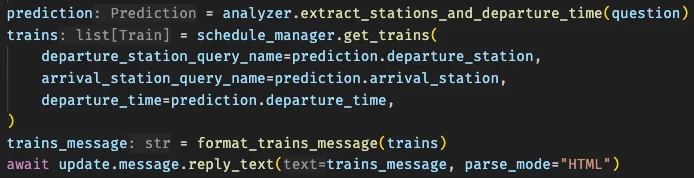
Once the Ruff and ty plugins are installed, VS Code will often show inferred types in gray text, similar to Rust with rust-analyzer. It looks great and is incredibly useful, so I highly recommend giving it a try.
This is only part one — in the next post, I’ll share even more things I learned while building Caltrain Bot.